

Petoi Nybble Q Lite
- Walking
- ≈1 h
- Degrees of freedom
- 11
- Controller
- BiBoard V1

Price on request · Available to order
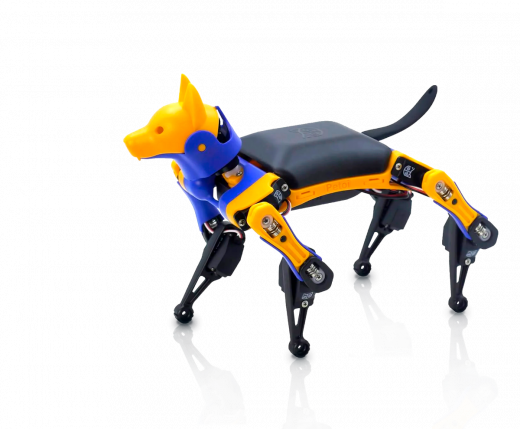
Petoi Bittle STEM Kit is an educational kit built around a programmable quadruped robot. It introduces mechanics, electronics and motion programming through a physical robot dog. Learners can change poses, combine actions and investigate how a command produces movement, linking software decisions to an observable result.
The official Bittle guide covers frame assembly, wiring, board setup and calibration. These can become separate teaching stages: identify a joint, connect it to the controller, test a movement and then build a longer sequence. This provides a practical route from individual components to coordinated behaviour.
Check the state and contents of the selected kit before planning a session. Assembly and calibration need time if they are part of the exercise. If the lesson focuses on programming, prepare the robots with consistent initial settings so differences in mechanical adjustment do not confuse the comparison between programmes.
Petoi supports Coding Blocks, C++ and Python. A course can begin with visual command sequences and progress to text-based code and a closer examination of control. The manufacturer provides C++ and Coding Blocks teaching resources that can support this progression, subject to selecting material appropriate to the learners.
Bittle uses the OpenCat platform. An educational or development project can use that foundation to study programme structure and multi-joint motion. Distinguish running a supplied movement, rearranging actions and creating a new behaviour: those activities require different levels of experience and preparation.
The Bittle manual describes the NyBoard controller and its Arduino Uno-compatible approach, with support for additional modules. This provides a basis for sensor projects that connect an observation to an action. A particular module still needs its own electrical connection and software support check.
A useful sensor exercise has a clear sequence: obtain a reading, evaluate a condition and trigger a defined movement. Expansion capability does not mean a camera, voice module or additional computer is included in every kit. List the hardware required for each learner station before comparing classroom packages.
The Bittle family has nine movable joints, including the head servo. Learners can investigate how changing a pose sequence affects body movement. Keep the floor surface, starting position and calibration consistent when comparing trials. This helps distinguish a programming issue from a mechanical setup or surface effect.
Calibration belongs in the learning process because the programme runs on real mechanics. After assembly or a mechanical change, check the neutral positions and basic movements before a more complex routine. Testing short actions separately makes debugging easier and helps learners connect code, hardware and observed behaviour.
For a UAE school, robotics club or education project, state the learners' experience, programming language and session length. Decide whether participants will assemble the robot, programme a prepared platform or add sensors. Use those choices to specify the complete equipment and teaching resources for each station.
A classroom acceptance check can be a repeatable short programme that every station can run, followed by an exercise students modify themselves. This confirms that the chosen hardware, programming tools and lesson level work together before expanding the course. Include time to restore the robot to its agreed starting state between groups.
Bittle STEM Kit is distinct from Bittle X and other Petoi models. Controller, servo and feature differences should remain visible when selecting equipment; a newer model's capability should not be transferred automatically to this kit. A confirmed package and reproducible exercises provide a stronger basis for a course than a combined feature list for the whole range.
Tell us about your task, site and robot. Leave your contact details so we can discuss the scope and next steps.